Web Development Tools
If you’re like me ever since I found out about browser web development tools, I can’t live without them anymore! Maybe you even started using Firebug for FireFox (~ years ago) just like me!? 🙂 Well I have switched to Chrome DevTools for some time now but everyday I’m still amazed on how helpful and powerful it is, and how it became an absolute must in my daily web developer life! Today I’m going to share something really cool I’ve learnt.
Save from console [browser] into json file
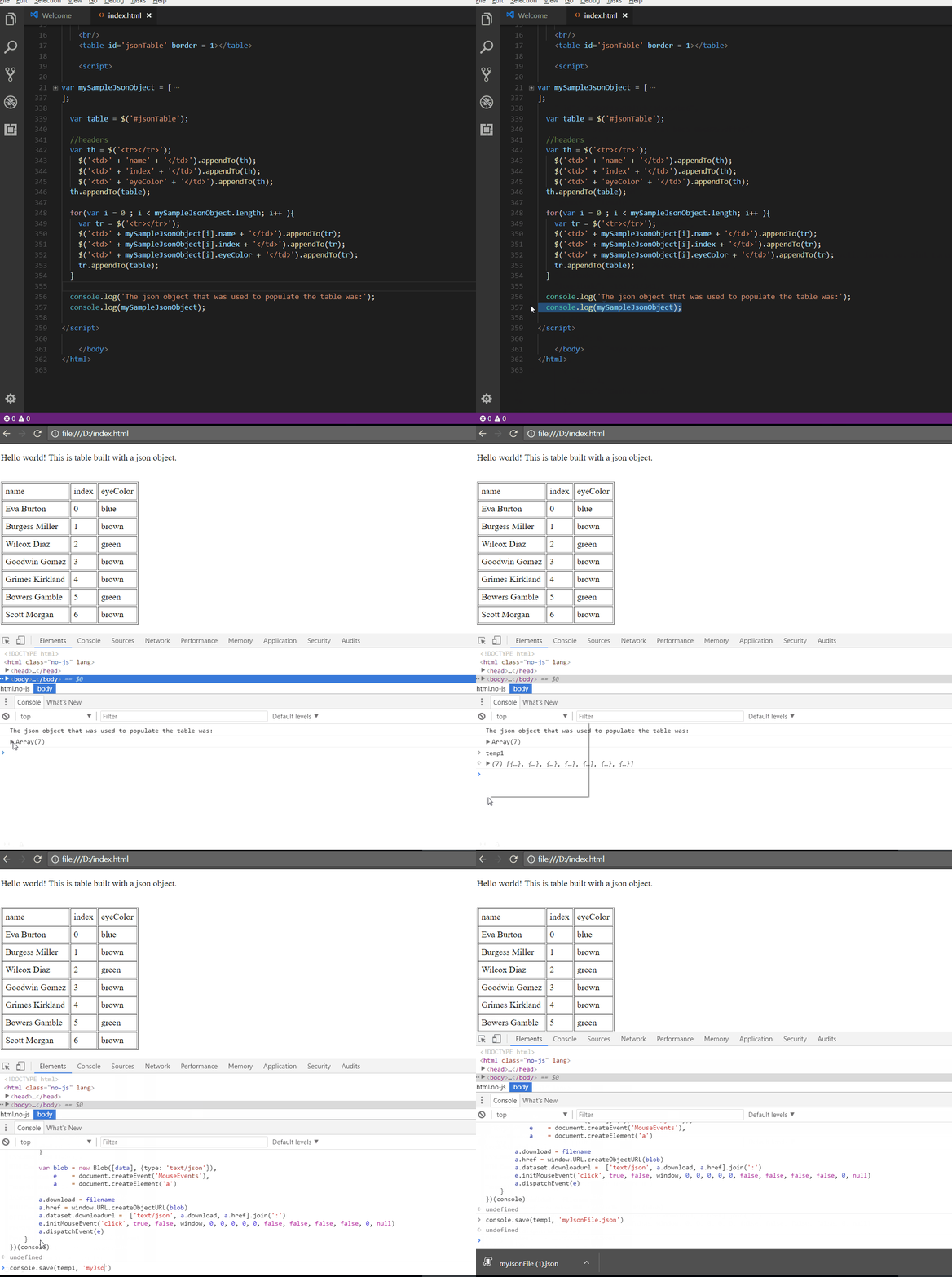
I really abuse on the “console.log” and “console.table” commands while I’m developing/debugging javascript, and this week I found out how it’s possible to save an object from the console [browser] into a Json file!! How awesome is that? Here is how I do it:
- In your web app, write to the console the object you want to save to a Json file, for instance:
- log(someJsonObjectFromMyWebApp)
- Right click on the output of the previous command, and click on “Store as a global variable”, and check which name it was set to the variable, it should have picked temp1;
- Paste the following code in the browser console:
(source)(function(console){ console.save = function(data, filename){ if(!data) { console.error('Console.save: No data') return; } if(!filename) filename = 'console.json' if(typeof data === "object"){ data = JSON.stringify(data, undefined, 4) } var blob = new Blob([data], {type: 'text/json'}), e = document.createEvent('MouseEvents'), a = document.createElement('a') a.download = filename a.href = window.URL.createObjectURL(blob) a.dataset.downloadurl = ['text/json', a.download, a.href].join(':') e.initMouseEvent('click', true, false, window, 0, 0, 0, 0, 0, false, false, false, false, 0, null) a.dispatchEvent(e) } })(console)
- save(temp1, ‘mybeautifulJsonObjectVariable.json’)
- Congratulations, you have now successfully saved a javascript variable (json), that was stored in the browser’s memory, into your computer filesystem!
How is this useful?
So I’ve been recently playing with Jasmine, and wanted to unit test a big javascript module I had developed, that had extensive business rules. To do so, while trying to setup my testing spec, I needed a really big json object, that was being build based on a couple of different server side objects and rules as well. With this method, I was able to easily extract the complete Json object, in order to use it in my Jasmine unit test spec!